
Your app. Your computer.
Install Kerix on your computer. Your saved posts, drafts, and history live in your own local workspace.
Find your audience, create content, and automate replies, DMs, and workflows. Kerix brings it all to one app that runs on your computer, powered by the AI you choose.
One-time license·Two computers·No Kerix subscription
Loading current price…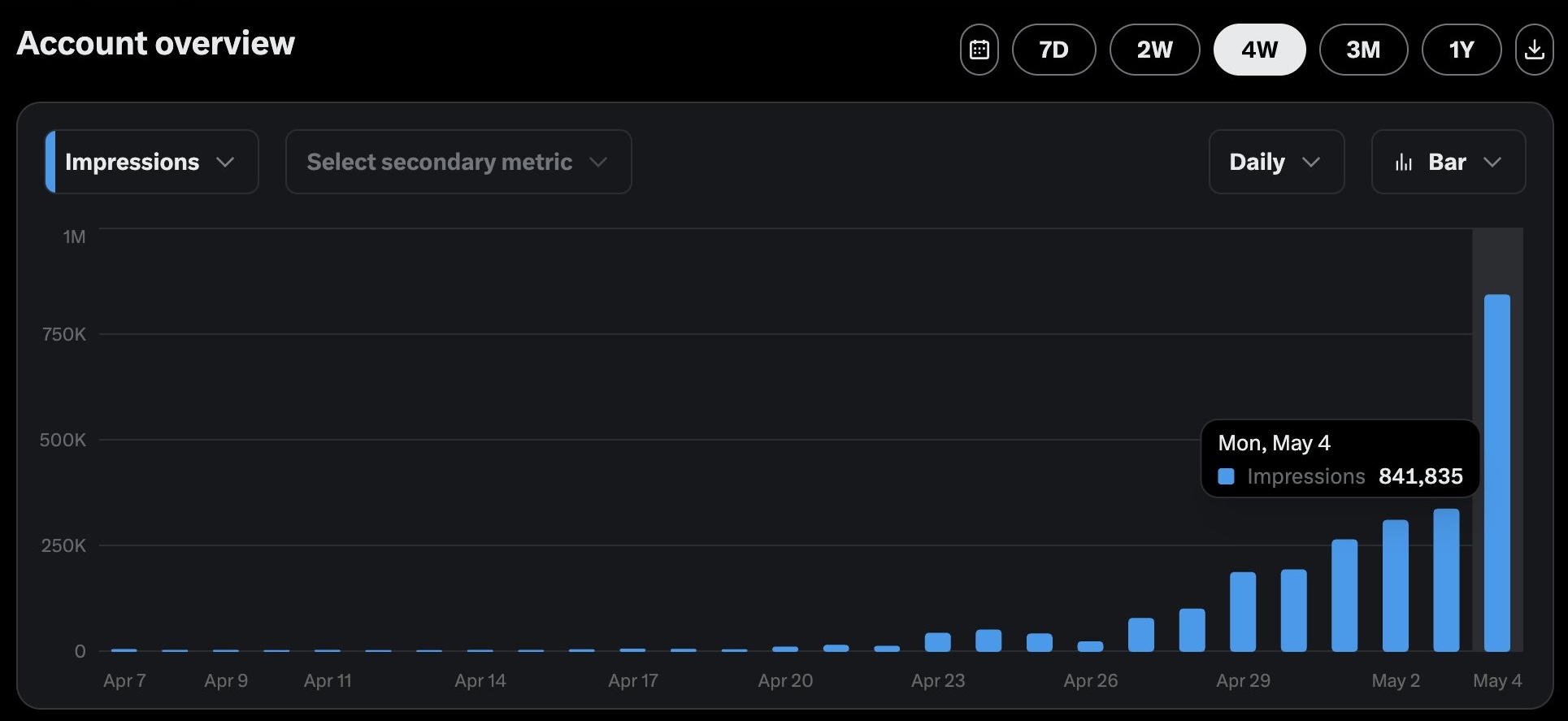
From the founder’s own X analytics.
 Built by a founder. Used by a founder.Follow the journey @buildwtim
YOUR LOCAL WORKSPACE.
YOUR CHOICE OF CONNECTIONS.
Install Kerix on your computer. Your saved posts, drafts, and history live in your own local workspace.
Bring your own OpenAI or Anthropic API key, or generate with an installed local model through Ollama.
Find your audience, write posts, start conversations, and run repeatable workflows from the same app.
From your first post to finding customers, Kerix connects audience research, AI writing, replies, DMs, and automation in one desktop workspace.
Find the posts that resonate in your niche and keep those signals close to your next idea.
Focus replies and DMs on people who fit your audience, with filters you can apply across your routine.
Reply to relevant posts with AI that uses your voice, Profile context, and the conversation in front of you.
Run focused DM campaigns with reusable templates, audience controls, and a record of every conversation.
Work with a post while you browse X inside Kerix, with writing tools beside the conversation.
Turn your niche, references, and point of view into post ideas and reusable writing templates.
Turn saved project descriptions and selected features into short product posts and graphics.
Turn your GitHub commits into build-in-public drafts that sound like you.
Connect the repeatable parts of your growth routine into visual playbooks you can configure and run again.
Give your AI the background it needs to write with your product, audience, and goals in mind.
Keep a clear record of replies, DMs, runs, and skip reasons so you can review and refine your routine.
Keep each brand or X account organized with its own searches, outreach context, and history.
Connect the repeatable parts of your day into a visual playbook. Your searches, replies, likes, follows, posts, and DMs—working together.
Less repetitive work. More room for the human part.
Workflows
Visual automation playbooks for repeatable Twitter growth
SaaS Launch Outreach
Product Hunt Launchers starter kit
Build an audience, share your work, find customers, or manage a brand. Start with the tools you need and build your own routine.
Use saved X searches and Tweet Intelligence to find relevant conversations, XPilot to reply in context, and Outreach to follow up. Your Profile keeps each message connected to your product.
Idea Lab turns your niche and references into writing ideas, GitHub Updates turns commits into drafts, and XPilot helps you join relevant conversations between posts.
Use visual workflows, Smart Filtering, Outreach templates, account-specific searches, and engagement history to organize the work for each client or brand.
Less friction at every step. useful signals disappear. engagement takes hours. ai misses your context. the learning loop gets lost. Your workspace gives every signal, draft, and conversation a place to go.
Connect your own OpenAI or Anthropic API key, or use an installed Ollama model for local generation. Choose the provider and model that fit your work and budget, and manage the connection in Kerix.
Your product, audience, and writing preferences give the AI context for your replies, ideas, and updates.
See how to connect your AIConnect your API key and choose your model.
Use Claude with your own Anthropic API key.
Generate with an installed model on your computer.
Cloud requests go to your chosen provider and usage is billed by that provider. The Kerix purchase includes no AI credits. Ollama needs a locally installed model.
Choose an available installer below, activate your license, and connect your AI. Then sign in to X inside the app and start building your growth routine.
Need a hand getting started? Follow the setup guide
A permanent Kerix license for two active computers.
Your local workspace. No recurring Kerix subscription.
Early buyers get a lower price. As each batch fills, the next price takes over. You get the same complete Kerix workspace.
Getting the current offer and license availability.
Early licenses are sold in batches. The current price and availability are confirmed at checkout.
A complete, step-by-step guide to growing on Twitter in 2026. Learn proven strategies, real examples, and how to use replies, DMs, and AI tools to grow your audience and get clients.
Read the guideA step-by-step Twitter outreach strategy for SaaS founders who want to generate leads, get early users, and build an audience, without cold email or paid ads.
Read the guideLearn how to automate Twitter replies without risking your account. This guide covers safe automation practices, rate limits, and the right tools for reply automation in 2026.
Read the guideHow the local app, your AI connection, and your license work.
A little more helpKerix is a growth platform for X that you install and run on your own computer. Research conversations, create posts and graphics, write and automate replies, send DMs, and connect repeatable tasks into workflows. Your saved workspace stays local, and you choose OpenAI, Anthropic, or an installed Ollama model to power AI features.
Kerix runs as an app on your computer, with its database, saved posts, drafts, history, and browser session stored on that computer. You choose your AI connection and manage your workspace in the app. One purchase gives you a permanent Kerix license for two active computers. Official builds require online activation and device verification at least every 30 days.
Connect your own OpenAI or Anthropic API key, or select an Ollama model installed on your computer. Choose your provider and model in Kerix settings. Cloud requests send the content needed for the request to your chosen provider, which bills usage separately. The Kerix license includes no AI credits. Ollama generation runs locally and requires a model you have already installed.
Open an X search or feed inside Kerix, choose your reply limit, tone, and delay range, then start a session. XPilot uses the post and your saved context to generate replies. You can follow progress, inspect history, pause, adjust, resume, or stop the run.
Create reusable DM templates, set a send limit and delay range, and run Outreach from the desktop app. Audience filters can help skip known contacts or accounts that do not fit your criteria, while history records what happened.
Generate ideas and templates from your niche, creator references, writing samples, and Profile context. Project Tweets turns saved project descriptions into short posts and graphics. GitHub Updates turns selected commits into build-in-public drafts using your saved voice guide.
Kerix is a one-time purchase for a permanent license on two active computers. Early licenses are sold in batches, with the price increasing as each batch fills. The pricing section shows the current offer, paid sales, and upcoming prices from the licensing service. Your price is confirmed at checkout before payment. There is no recurring Kerix subscription. Cloud AI usage is billed separately by the provider you connect.
There is no Kerix website account or website login. Buy a license, enter the issued key in the desktop app, and set up your workspace there. Checkout asks for an email address to link the purchase to its license and help locate a lost key. Sign in to X inside Kerix when you want to use your social account.
First activation requires an internet connection. Official builds renew device verification online at least every 30 days. If verification lapses, reconnect to renew it; the perpetual purchase does not expire. A revoked entitlement cannot activate or renew verification.
One license supports two active computers. To move a seat, deactivate an existing computer from the app’s license settings while online, wait for confirmation, and then activate the other computer.
The standalone app keeps its database and browser session in application data on your computer. Provider keys and session credentials use protected storage. Hosted AI requests send the content and context needed for the request to your chosen provider; local Ollama generation runs on your computer. Publishing sends the content you submit to the social service.
The downloads section shows current availability and versions for Windows x64, Apple Silicon Mac, and Intel Mac. Only available platforms have installer links. The desktop app includes its local service and database, so you do not need to install a separate backend.
Kerix uses an embedded browser for X, where you sign in to your social account. The website does not ask for that login or your local connection credentials. AI provider keys, if you use hosted AI, are entered only in the desktop app.